Most delays in client work start with the first request. The client is not sure what you need, sends half of it, sends the wrong version, or waits for a better moment. You then spend days on follow-ups that a clearer request would have prevented.
This guide shows how to request documents from a client so that they know exactly what to send, where to send it, and by when. It includes sample wording you can copy and checklists for common situations. For the security side of collecting files, see how to collect documents from clients securely.
The short answer
A good document request has five parts: a specific list of what you need, a one-sentence instruction for each item, a due date, one place to send everything, and a short message that explains why you are asking. Send it once, track what comes back, and follow up only on what is missing.
What makes a document request work
Here is the same request written two ways. The second answers every question the first one forces the client to ask.
Name each document exactly
"Financial records" invites guesswork. "Bank statements for all checking and savings accounts, January through June" does not. Name the document, the period it covers and, where it matters, whose it is (yours, your spouse's, the business's).
Add one sentence of instruction to each item
The instruction answers the questions a client would otherwise email you:
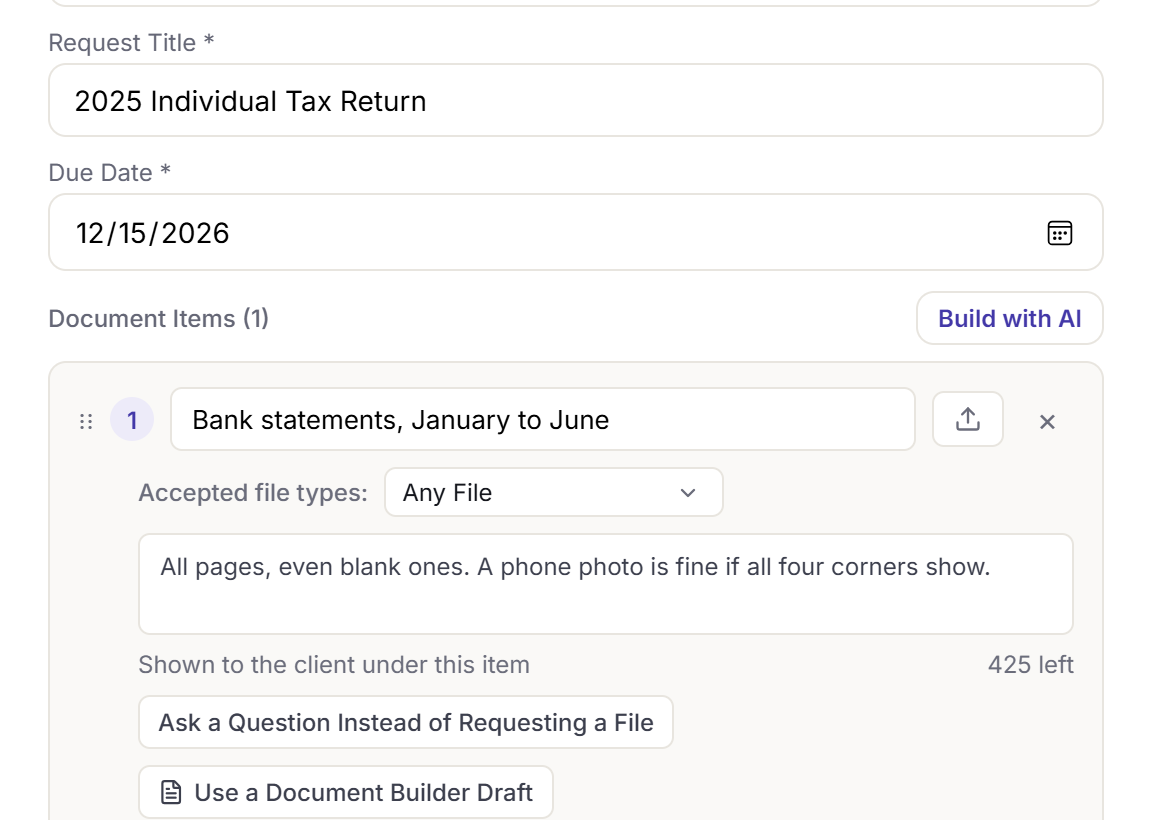
- Which pages? ("All pages, including blank ones.")
- What format? ("A clear photo from your phone is fine. Make sure all four corners are visible.")
- What if they do not have it? ("If you do not have this, tell us and we will work around it.")
Say why you are asking
People send documents faster when they understand the purpose. One line is enough: "We need these to prepare your return" or "The lender requires these before they can approve your application."
Set a due date, and make it real
A date such as "by Friday, March 8" gets a plan made around it. "As soon as possible" gets none. Pick a date that gives you room to do your own work, and say what happens if the documents arrive late if that is true.
Give one place to send everything
If clients can reply to an email, text a photo or drop something off, you will chase files across three places. Name a single channel and keep to it. A private upload link with a checklist is the simplest, because the client sees what is still missing as they go.
Keep the list as short as honestly possible
Every extra item lowers the chance the client finishes, and every file you hold is one more you must protect. Ask for what the work requires. If something is only "nice to have", leave it out or mark it optional.
Sample request message
You can copy and adapt this. Keep it short, because the checklist carries the detail. The free document request message writer drafts this message for different situations and tones.
Hi [Name],
To get started on [your tax return / your loan application / your case], I need the documents on the list at the link below. Each item says what to send and how. You do not need to create an account, and you can add documents over several days.
Please send everything by [date]. If anything on the list does not apply to you, or you cannot find something, just tell me and we will sort it out.
The link is private to you, so please do not forward it. If you are unsure the message is genuine, call me on [number] before you upload anything.
Thank you, [Your name]
The last paragraph matters. Clients are right to be wary of links, and inviting them to check with you protects them and you.
Copyable checklists
These are starting points. Remove what does not apply and add instructions for your own situation. For other practice areas, including estate planning, bankruptcy and immigration, the free document checklist generator lets you edit a list and save it as a PDF.
Individual tax return
- Photo ID (driver's license or passport), front and back
- Last year's tax return, all pages
- Income forms: W-2s, 1099s, and any other income statements
- Bank and brokerage interest and dividend statements
- Mortgage interest statement and property tax bill
- Records of charitable donations, with receipts for larger gifts
- Health insurance forms
- Childcare or education expense statements
- Any letters from the tax authority received this year
Mortgage or loan application
- Photo ID, front and back
- Last two years of tax returns, all pages
- Pay stubs for the last 30 to 60 days
- Bank statements for the last two to three months, all pages
- W-2s or 1099s for the last two years
- Statements for retirement and investment accounts
- Documents explaining large or unusual deposits
- A signed copy of the purchase agreement, if applicable
- Proof of homeowner's insurance
New client onboarding
- Photo ID, front and back
- Proof of address dated within the last 90 days
- Signed engagement or service agreement
- Completed intake form
- Any documents specific to the matter, listed individually, each with an instruction
Small business bookkeeping or year-end
- Business bank and credit card statements for the full period
- Sales reports and invoices issued
- Bills and receipts for expenses
- Payroll reports and tax filings
- Loan and lease statements
- Prior-year financial statements and tax return
- Asset purchase and sale records
When a checklist includes a form to fill in, such as an intake form, a questionnaire or an agreement to sign, put it in the same request instead of emailing it separately. See how to collect e-signatures and forms without printing.
After you send the request
- Watch what arrives. Note which items are in and which are missing without opening every file.
- Review early. Open files soon after they arrive. Catching a blurry photo on day one is much easier than on the due date.
- Reject clearly. If a file is wrong, say what is wrong and what to send instead. "This page is cut off on the right side. Please retake it with the whole page in view" is fixed in minutes.
- Follow up on a schedule. Decide ahead of time when clients hear from you. See how to get clients to send documents on time.
- Close the loop. When everything is in, tell the client. Otherwise they keep wondering.
Common mistakes when requesting documents
- Sending the list as a long paragraph. Use one line per document so each can be checked off.
- Asking for "everything". The client cannot know what that means.
- Rewriting the request every time. Save a template for each type of work so the list and instructions stay consistent.
- Mixing requests. A separate request per matter or per tax year keeps files from different jobs apart.
- No way to answer questions. Make it clear that the client can reply or call with questions.
Where docEvault fits
In docEvault you build the checklist once, with an instruction on each item, and save it as a template for next time. You then send the client a private link by email or, on the Professional and Enterprise plans, by text. The client sees the list, uploads each document from a phone or computer without creating an account, and can message you from the same page. You see which items are in, approve or reject each file with a reason, and set automatic reminders for what is still missing. A form to complete or a document to sign can sit on the same checklist.
You can try docEvault, or read how to create a document request or save a template.
Frequently asked questions
What should I include when I ask a client for documents?
The name of each document and the period it covers, a one-sentence instruction on each, the reason you need them, a due date, and a single place to send everything.
How do I ask a client for documents without sounding pushy?
State what you need and why, give a reasonable date, and invite questions. Specific, calm requests read as helpful. Vague ones prompt anxious emails and delays.
Should I send the list in an email or a separate document?
A checklist the client can work through is better than a paragraph in an email. The best option is a checklist attached to the place where they upload, so the list and the uploads stay together.
How many documents should I ask for at once?
Ask for everything you will need for this stage of the work, and no more. If a second stage needs different documents, send a second request later.
What if a client does not have a document?
Say in the request that they should tell you instead of ignoring the item. Often there is an alternative, or the document is not needed.