Late documents are rarely a sign that a client does not care. Usually they forgot, were not sure what to send, could not find something, or were waiting for a quiet hour that never came. The good news is that each of those has a fix, and most of the fixes are about how you ask, not how hard you chase.
This guide explains why clients send documents late and what you can do about it: set the request up well, remind clients in the right way, and handle the ones who go quiet. If you are still shaping the first request, see how to request documents from a client.
The short answer
To get documents on time, give clients a specific checklist, a real due date and one easy place to upload, then send automatic reminders by email and text until the request is complete. Make each reminder say exactly what is still missing, and reach out personally only when a client has gone quiet after several reminders.
Why clients send documents late
Understanding the cause tells you which fix to use. To see what late documents cost your own practice, try the free document chasing cost calculator.
- They forgot. The request arrived in a busy week and slipped down the inbox. A reminder fixes this.
- They did not know what to send. A vague list leaves them unsure, and unsure people wait. Clear instructions fix this.
- They could not find it. Old statements and IDs are in a drawer or an online account they have to log into. Telling them where to look, and giving them time, fixes this.
- The process was a hassle. Creating an account, scanning at a library or printing a form all add friction. Letting them upload a phone photo fixes this.
- They were embarrassed or worried. Some documents feel personal. A calm, matter-of-fact tone and an invitation to ask questions help.
- They did not think it was urgent. A due date without a reason is easy to ignore. Saying what depends on it helps.
Set the request up to be finished
The biggest wins come before any reminder is sent.
- Make the list specific. "Bank statements, January to June, all pages" rather than "financial records".
- Explain each item in a sentence. Where to find it, what format is fine, what to do if they cannot get it.
- Give a date and a reason. "By March 8, so we can file before the deadline" lands better than "soon".
- Offer an easy way to upload. A link that opens on a phone, with no account, lets someone finish in a spare ten minutes. Photographing a document should be acceptable if the picture is clear.
- Break very large requests into stages. Ten items now and the rest later gets more done than thirty items at once.
Remind clients without being a nuisance
Reminders work. They only become annoying when they are vague, too frequent or sent at odd hours.
Decide the schedule once
A sensible default is a reminder every few days up to the due date. After the date, automatic reminders have done their job, and a personal follow-up works better. Set the schedule when you create the request so you are not deciding each time, and so every client gets the same treatment.
Use both email and text, where you are allowed to
Email is good for detail and a link. A text message is read within minutes and is often what finally prompts action. Texts need the recipient's consent, and rules differ by country, so make sure you have it before you send. See how SMS reminders and consent work in docEvault.
Say what is missing, not just "please send documents"
"Hi Sam, we still need your 2025 W-2 and the last page of your bank statement. Here is your link" is easy to act on. "Reminder: documents due" is easy to ignore. The best reminders name the specific items that are still open. The free document request message writer drafts reminders from a first request through a final notice.
Keep the tone friendly
You are helping the client reach an outcome they want. Short, polite and specific beats stern. Save firmer wording for the last reminder, and say plainly what happens if the date is missed, if it is true.
Respect the hours people read messages
Avoid sending reminders late at night or early in the morning. A message that arrives mid-morning on a weekday has the best chance of being read and acted on.
When a client goes quiet
Sometimes reminders do not work. Move through these steps.
- Check the message arrived. The email address may be wrong, a message may be in spam, or a phone number may be old. A quick call can confirm. If emails to a client are not reaching them, see what to do when a contact is not receiving reminders.
- Call. A two-minute conversation settles questions that ten emails will not.
- Ask what is in the way. "Is there something on the list that is hard to get?" often reveals an easy fix.
- Offer to take partial progress. Ask the client to send what they have now.
- Offer another route for the hard items. Perhaps a bank can send a statement directly, or you can accept a photo now and a better copy later. If a client sends several photos of one document, the free image to PDF tool combines them into a single file, and the HEIC converter handles iPhone photos that other systems reject.
- State the consequence. If the date matters, say so clearly and kindly, so the client can make a real choice.
Make the process visible to the client
Clients move faster when they can see their progress. A checklist that shows what is done and what is left gives a sense of momentum, and a message box on the same page makes it easy to ask a question instead of putting the whole thing off.
Tell clients when you have received something and when everything is complete. Silence after an upload makes people wonder whether it worked, and they may send it again by email.
Mistakes that slow clients down
- Starting with a long, unstructured email. Use a checklist.
- Using more than one channel. A client who is told to email, upload and also bring paper will do none promptly.
- Reminding on an irregular schedule. Predictable timing is easier to plan around and easier for you to manage.
- Reminding about everything. Once an item has arrived, stop mentioning it.
- Never closing the request. An old, open request teaches clients that deadlines are optional.
Where docEvault fits
In docEvault each request has a due date and a checklist, and you choose how often reminders go out, from every day to every two weeks (every three days is the default). Reminders go out by email and, on the Professional and Enterprise plans where the contact has agreed to texts, by text. Easy Start sends reminders by email only. They run up to the due date, and there is no fixed number: how many go out depends on the frequency you choose and how many days are left. After that the automatic schedule stops, and you can still send a reminder by hand. You can edit the wording, and you can see exactly what was sent. Clients upload from a private link with no account, so there is little standing in their way.
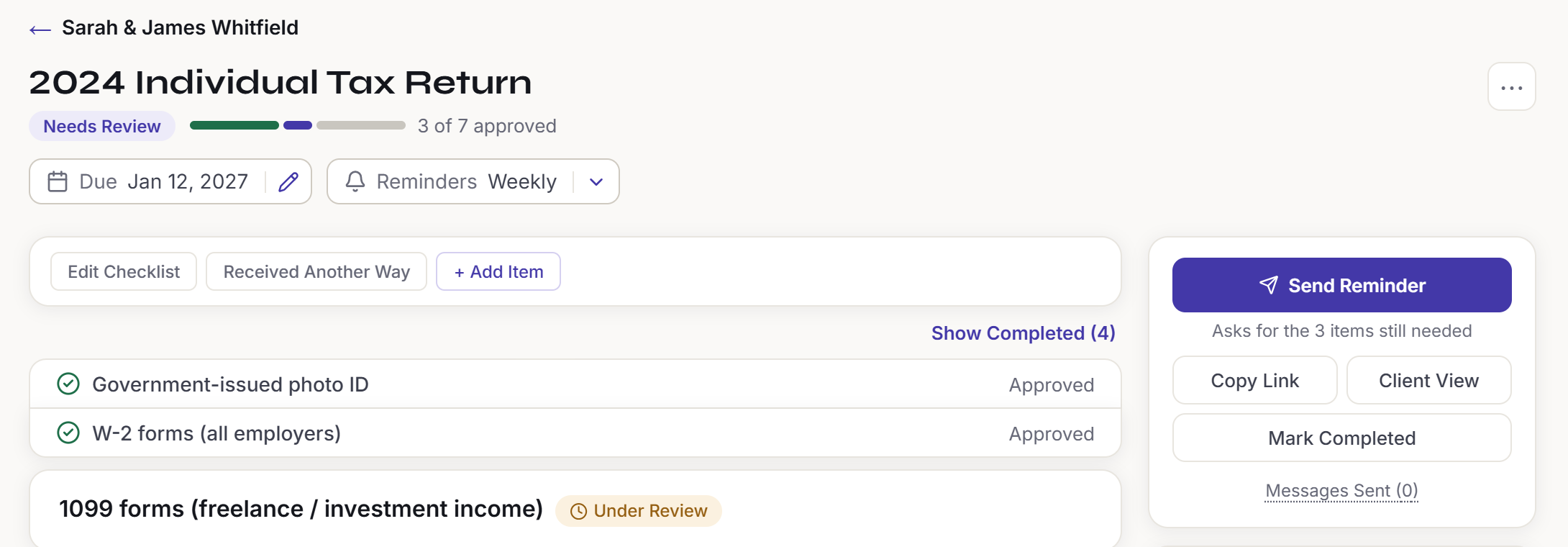
To see it in action, try docEvault, or read how reminders and message sequences work and how to schedule a request to go out later.
Frequently asked questions
How often should I remind a client about missing documents?
A reasonable pattern is a reminder every few days until the due date, then a personal follow-up. The exact rhythm matters less than being consistent and specific.
Are text message reminders better than email?
Text messages are usually read faster, so they are often better for the nudge that gets action. Email is better for detail. Use both where you have consent to text.
Do I need permission to text clients?
Usually yes. Rules vary by country and by the kind of message, so check what applies to you, and keep a record of each client's consent.
What should I do if a client keeps missing the deadline?
Check that the messages are reaching them, call, find out what is in the way, accept partial progress, and state clearly what the deadline affects.
How do I stop clients from sending documents by email instead?
Name one official channel in your first message and respond to emailed files with a friendly pointer to the upload link. Clients follow the process you make easy.