If your work depends on getting documents from clients, such as tax returns, IDs, bank statements, contracts or medical records, you have probably collected them by email. It works until the day it doesn't: a client attaches the wrong file, a message lands in spam, a laptop is stolen, or you spend an afternoon asking the same person for the same missing page.
This guide explains how to collect documents from clients securely, without making it harder for the client. It covers why email is a weak place for sensitive files, what a better method needs, and a simple process you can start using this week.
The short answer
To collect documents from clients securely, stop using email attachments and give each client a private, encrypted upload link instead. Tell them exactly which documents you need, track what has arrived, and remind them automatically about what has not. Keep the files in one controlled place, not scattered across inboxes and downloads folders.
The rest of this guide explains each part.
Why email attachments are a risky way to collect documents
Email was built to send messages, not to protect files. For sensitive documents it has several weaknesses:
- Copies multiply. Every attachment is stored in the client's sent folder, your inbox, any phone that syncs the account, and every backup of those. Deleting it from one place does not remove it from the others.
- Accounts get compromised. One reused password or phishing click exposes years of attachments sitting in a mailbox.
- Messages are not always encrypted end to end. Many providers encrypt the connection between servers, but the message itself is readable by the providers that handle it, and in some cases by anyone who reaches the mailbox.
- Size limits break the process. A phone-camera PDF or a scanned statement can bounce. Clients then switch to a less secure workaround, such as a public file-sharing link or a text message.
- Nothing is tracked. You cannot see at a glance what has arrived, what is still missing, or which version is current.
- Mistakes are easy. A client who sends documents to the wrong address cannot take them back.
None of this means every email is a disaster. It means email gives you no control over where sensitive files end up, and no structure for collecting them.
What a secure way to collect documents needs
Whatever tool or process you choose, check it against this list.
1. Encryption in transit and at rest
Files should be encrypted while they travel from the client to you (look for HTTPS) and while they are stored. Some tools also offer end-to-end encryption, where only your own team can open the files and not even the provider can read them. That is the strongest option, and it has a trade-off: if the key is lost, the files cannot be recovered. Ask how key backup works before you rely on it.
2. A private link, not a shared inbox
Each client should get a link that works only for their request. Anyone who finds the link should not be able to see another client's documents, and you should be able to send a new link if one is shared by mistake.
3. No account for the client to create
Every extra step costs you completed uploads. Clients abandon requests that make them register, confirm an email address and invent a password. A link that opens straight to the upload page gets documents faster.
4. A clear list of what you need
The most common reason a request drags on is that the client is not sure what to send. A checklist of named items (Last two years of tax returns, Photo ID, front and back) with a short instruction on each beats a paragraph in an email.
5. Tracking and review
You should be able to see which items have arrived and which are missing without opening anything. You should also be able to reject a file, for example a blurry photo, with a reason, so the client knows what to fix.
6. Reminders you do not have to send yourself
Most late documents are not refused, just forgotten. Automatic email or text reminders, sent on a schedule until the request is complete, remove the chasing.
7. Access control and a record
Know who on your team can open client files, and keep a log of what was uploaded, viewed and downloaded and when. That record answers "did the client ever send this?" in seconds.
A simple process you can start this week
You do not need to change your whole practice at once. This is a workable order of steps.
- List the documents you need, in one place. For a repeat engagement, such as a new tax client or a loan application, write the list once and save it as a template. The free document checklist generator is a quick way to start the list.
- Explain each item in a sentence. "Bank statements: all pages, even blank ones, for the last three months." Specific instructions prevent re-requests.
- Set a due date. A date turns "whenever you can" into something a client plans around.
- Send one secure link. Include a short message that says who you are, what the link is for, and that no account is needed. Tell clients how to check that the request is genuine, for example by calling your office, because they have been taught to be wary of links.
- Let reminders do the chasing. Decide in advance how often a client hears from you, for example a reminder three days before the due date, on the due date, and a few days after.
- Review as files arrive. Approve what is right and reject what is not, with a one-line reason. Clients usually fix a clearly explained problem within a day.
- Move finished files to where you keep records. Once a request is complete, store the documents in your normal file system or practice-management software, and delete what you no longer need to hold.
Mistakes that undermine secure collection
- Asking for more than you need. Every extra document is more to protect. Request only what the task requires.
- Letting clients pick their own method. A single official channel is easier to secure and to explain than three informal ones.
- Sending the link to a shared or guessed address. Confirm the right email address or phone number before you send.
- Forgetting to close the request. A link that stays open forever is an unnecessary risk. Close or expire it when the work is done.
- Keeping documents indefinitely. Decide how long you must retain files, and delete them when that time ends.
- Skipping the human check. Fraudulent "document request" messages are common. A line in your first email telling clients how to verify a genuine request protects them and you.
What about legal and compliance requirements?
Rules differ by profession and by place. Lawyers have confidentiality duties, tax preparers must follow safeguarding rules, and healthcare, lending and education each have their own. A tool cannot make you compliant by itself, and a vendor that promises that deserves a second look. Treat the tool as one part of your obligations: confirm what your regulator or professional body expects, ask the vendor how they protect data and what they will and will not sign, and keep your own written policy for who may access client files and how long you keep them.
Where docEvault fits
docEvault is a document-collection tool built around the process above. You build a checklist of the documents you need and send the client a private upload link. They open it on a phone or computer with no account or password and upload each item, and you see what has arrived, approve or reject files with a reason, and let automatic reminders chase what is missing (by email, and by text on the Professional and Enterprise plans). Files are encrypted in transit and in storage, and you can turn on end-to-end encryption so that only your own team can open them. It also supports e-signatures and fillable forms, so a client can complete and sign without printing anything.
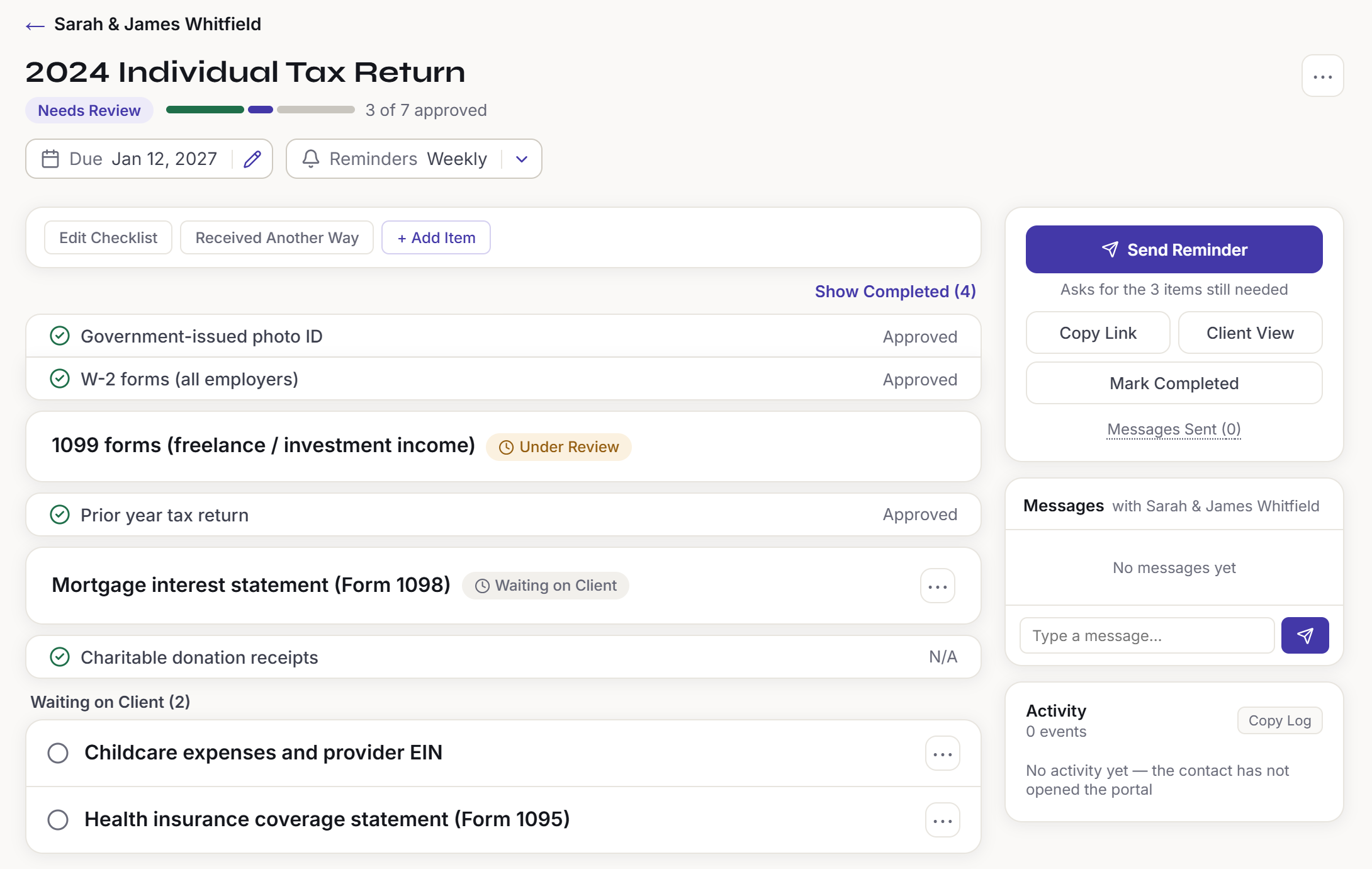
If you want to try it, you can start a trial of docEvault. If you would rather read more first, see how a document request works, how docEvault protects your data, or how reminders work.
Frequently asked questions
Is it safe to ask clients to email me documents?
It is common, but it is the weakest option for sensitive files. Email copies spread across several mailboxes and devices and are hard to control or delete. A private upload link keeps the files in one place you control and gives you a record of what arrived.
What is the most secure way to receive documents from a client?
An upload portal that encrypts files in transit and at rest, gives each client a private link, and restricts who on your team can open the files. End-to-end encryption is stronger still, with the trade-off that lost keys cannot be recovered.
Do my clients need to create an account?
They should not have to. Requiring an account lowers completion rates. A private link that opens directly to the upload page is easier for clients and just as safe when the link is unique to them.
How do I get clients to send documents on time?
Give them a specific checklist, a due date and one link, then use automatic reminders by email and text. Most delays come from forgetting or not knowing what to send, and both are fixed by clear instructions and reminders.
Can I collect signatures and forms the same way?
Yes. Many tools, docEvault included, let a client fill in a form and sign it online in the same request, so you do not have to print, scan and re-upload.
How long should I keep client documents?
It depends on your profession and the law where you work. Your regulator or professional body can tell you the minimum retention period, so keep documents at least that long, then delete them securely.